Warning: Attempt to read property "ID" on null in /www/wwwroot/www.shipinzan.com/wp-content/plugins/pods/src/Pods/Whatsit/Storage/Post_Type.php on line 423

Warning: Attempt to read property "post_name" on null in /www/wwwroot/www.shipinzan.com/wp-content/plugins/pods/src/Pods/Whatsit/Storage/Post_Type.php on line 424

Warning: Attempt to read property "post_title" on null in /www/wwwroot/www.shipinzan.com/wp-content/plugins/pods/src/Pods/Whatsit/Storage/Post_Type.php on line 425

Warning: Attempt to read property "ID" on null in /www/wwwroot/www.shipinzan.com/wp-content/plugins/pods/src/Pods/Whatsit/Storage/Post_Type.php on line 423

Warning: Attempt to read property "post_name" on null in /www/wwwroot/www.shipinzan.com/wp-content/plugins/pods/src/Pods/Whatsit/Storage/Post_Type.php on line 424

Warning: Attempt to read property "post_title" on null in /www/wwwroot/www.shipinzan.com/wp-content/plugins/pods/src/Pods/Whatsit/Storage/Post_Type.php on line 425

Warning: Attempt to read property "ID" on null in /www/wwwroot/www.shipinzan.com/wp-content/plugins/pods/src/Pods/Whatsit/Storage/Post_Type.php on line 423

Warning: Attempt to read property "post_name" on null in /www/wwwroot/www.shipinzan.com/wp-content/plugins/pods/src/Pods/Whatsit/Storage/Post_Type.php on line 424

Warning: Attempt to read property "post_title" on null in /www/wwwroot/www.shipinzan.com/wp-content/plugins/pods/src/Pods/Whatsit/Storage/Post_Type.php on line 425

Warning: Attempt to read property "ID" on null in /www/wwwroot/www.shipinzan.com/wp-content/plugins/pods/src/Pods/Whatsit/Storage/Post_Type.php on line 423

Warning: Attempt to read property "post_name" on null in /www/wwwroot/www.shipinzan.com/wp-content/plugins/pods/src/Pods/Whatsit/Storage/Post_Type.php on line 424

Warning: Attempt to read property "post_title" on null in /www/wwwroot/www.shipinzan.com/wp-content/plugins/pods/src/Pods/Whatsit/Storage/Post_Type.php on line 425
什么软件可以录制电脑屏幕视频 QQ录屏 - 视频赞
视频录制

什么软件可以录制电脑屏幕视频

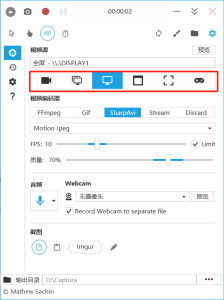
本文介绍了3款可以录制电脑屏幕视频的好用软件,相信你看完应该有了初步的了解。其中,录猎是没什么限制的,无论你是新手小白还是经常录制视频教程的人,它都适用,而Captura适用于有点录屏基础的人,如果你不经常录屏且电脑又装有QQ,那直接使用QQ自带的录屏工具录制也行。你可以选择最适合自己的一款,然后去录制电脑屏幕。