Warning: Attempt to read property "ID" on null in /www/wwwroot/www.shipinzan.com/wp-content/plugins/pods/src/Pods/Whatsit/Storage/Post_Type.php on line 423

Warning: Attempt to read property "post_name" on null in /www/wwwroot/www.shipinzan.com/wp-content/plugins/pods/src/Pods/Whatsit/Storage/Post_Type.php on line 424

Warning: Attempt to read property "post_title" on null in /www/wwwroot/www.shipinzan.com/wp-content/plugins/pods/src/Pods/Whatsit/Storage/Post_Type.php on line 425

Warning: Attempt to read property "ID" on null in /www/wwwroot/www.shipinzan.com/wp-content/plugins/pods/src/Pods/Whatsit/Storage/Post_Type.php on line 423

Warning: Attempt to read property "post_name" on null in /www/wwwroot/www.shipinzan.com/wp-content/plugins/pods/src/Pods/Whatsit/Storage/Post_Type.php on line 424

Warning: Attempt to read property "post_title" on null in /www/wwwroot/www.shipinzan.com/wp-content/plugins/pods/src/Pods/Whatsit/Storage/Post_Type.php on line 425

Warning: Attempt to read property "ID" on null in /www/wwwroot/www.shipinzan.com/wp-content/plugins/pods/src/Pods/Whatsit/Storage/Post_Type.php on line 423

Warning: Attempt to read property "post_name" on null in /www/wwwroot/www.shipinzan.com/wp-content/plugins/pods/src/Pods/Whatsit/Storage/Post_Type.php on line 424

Warning: Attempt to read property "post_title" on null in /www/wwwroot/www.shipinzan.com/wp-content/plugins/pods/src/Pods/Whatsit/Storage/Post_Type.php on line 425

Warning: Attempt to read property "ID" on null in /www/wwwroot/www.shipinzan.com/wp-content/plugins/pods/src/Pods/Whatsit/Storage/Post_Type.php on line 423

Warning: Attempt to read property "post_name" on null in /www/wwwroot/www.shipinzan.com/wp-content/plugins/pods/src/Pods/Whatsit/Storage/Post_Type.php on line 424

Warning: Attempt to read property "post_title" on null in /www/wwwroot/www.shipinzan.com/wp-content/plugins/pods/src/Pods/Whatsit/Storage/Post_Type.php on line 425
视频赞 视频赞 - 第 58 页 - 视频赞
视频录制

实现电脑自动录屏6种软件

录猎可以同时设置录屏的起止时间,可以分段录制,录屏结束后还可以为它设置关机、睡眠等等。并且可以直接对录制好的视频进行剪辑分享等。

视频录制

电脑怎么录屏直播

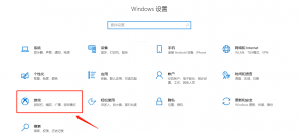
电脑自带录屏功能,以windows系统举例,点击桌面左下角windows图标,点击打开“设置”按钮。在设置页面中,点击“游戏”选项进入